
cm.abstract.dataSymbol
Catalog Material Quantity
DsPart.materialQty(SpecOption specOpt, str adjustmentKey) now resolves material quantities from data-symbol catalogs where that data has been supplied. Extensions can override the method to build on this lookup with their own quantity handling.
Part Measurements and Generic Codes
DsPrdMeasurementColumn can now be registered for a specific package, and dsUnitConvertFactor(distanceUnit, str) provides string-based measurement conversion alongside the existing enum overload.
cm.abstract.materialHandling
Multi-racking framework changes
Rows in the multi-racking framework are now meant to also contain back-to-back layouts. In the normal framework, a back-to-back layout is typically represented with two rows of bays connected with a flue gap row in between them. In the multi-racking framework, they will now be represented with a single row containing a multi-bay of at least two bays facing opposite directions. Due to this, we have added new row layout classes that utilizes a MhMultiRowPopulator instead that can handle different row layouts for the front and back.
public class MhMultiRowLayout extends MhRowLayout { }
public class MhSingleEndMultiRowLayout extends MhMultiRowLayout { }
public class MhSingleAllMultiRowLayout extends MhMultiRowLayout { }
public class MhDoubleAllMultiRowLayout extends MhMultiRowLayout { }

public class MhMultiRowPopulator extends MhRowEntryLayoutPopulator { }
We have also added a new MhMultiRowAnimationInfo to properly calculate the minimum row depth required for a given row layout during insert animation.
public class MhMultiRowAnimationBehavior extends MhRowAnimationBehavior {

    public SnapperAnimationBehaviour snapperAnimationBehavior() {
        return MhMultiRowSnapperAnimationBehavior();
    }
}


public class MhMultiRowSnapperAnimationBehavior extends MhRowSnapperAnimationBehavior {

    public MhRowAnimationInfo rowInfo(Snapper z) {
        return MhMultiRowAnimationInfo();
    }

}

public class MhMultiRowAnimationInfo extends MhRowAnimationInfo { }
Other new behaviors:
MhMultiFrameEngineBehavior
MhMultiRowAnimationEngineBehavior
New engine functions:
MhMultiRowSystemPopulateFunction
MhMultiEntryArrangeFunction
MhMultiLevelConstructionalPopulateFunction
New spawners:
MhFramelineSpawner
MhOuterFramelineSpawner
MhOuterFramelineSpawnerB2B
MhMultiBaySpawner
Added support to constructing spanning levels (levels that belong to the multi-bay) on row insertion through MhMultiLevelConstructionalPopulateFunction. This function "multiLevelConstruction" is meant to replace the generic MhLevelConstructionalPopulateFunction "levelConstruction". The "multiLevelConstruction" function operates on the multi-bay and will construct levels for the multi-bay as well as all the child-bays within the multi-bay.
public class MhMultiLevelConstructionalPopulateFunction extends MhSystemEngineFunction { }

res << MhMultiLevelConstructionalPopulateFunction("multiLevelConstruction");
When constructing levels, for each iteration it will retrieve the next level entry (ideally from a bay entry layout that already contains predefined level information) and inspects the entry's childDepth, a new field introduced in MhEngineLevelConstructionEntryInfo. childDepth identifies which bay does that level entry belong to (multi-bay or child-bay). As an example, with a structure of
Row
|---MultiBay
|   |---Level
|   |---ChildBay
|       |---Level
Levels with a childDepth = 1 will belong to the MultiBay while levels with a childDepth = 2 will belong to the ChildBay. Similar to "levelConstruction", the generated levels will be updated to match the width and depth dimensions of the parent bay.
To properly utilize this new function, you will need to set up level entries with a childDepth assigned to them. Our way of setting this up has been through compartment types and compartment props (introduced as a new feature in 17.0 Major migration guide). The compartment prop has a childDepth() method that defines the child depth of a level. This information is used in MhBaySpawner.entryLayout(MhEntryLayoutEnv env) through MhStorageConfiguration in order to generate level entries for the bay entry layout. The layout is then accessed by "multiLevelConstruction" to look up those generated level entries for the relevant info. For an example implementation, refer to the under development Essential Racking extension (base.custom.materialHandling.products.essentialRack).
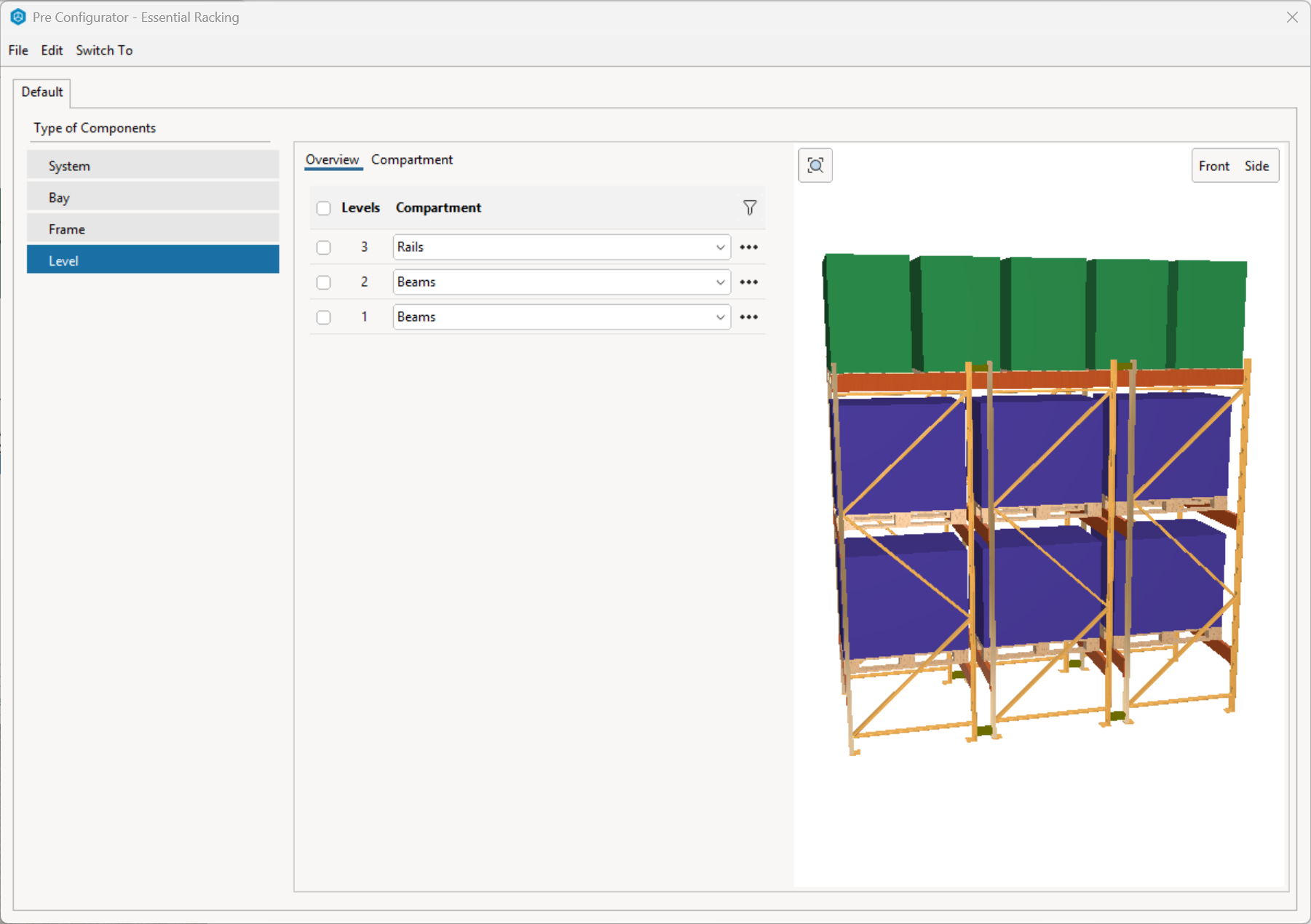
Schemes
Added support for prop schemes to work with storage systems. This is an optional feature and there is some overlap in terms of functionality with the Pre Configurator dialog. An example implementation can be found in the Essential Shelving extension Retail Shelving product line, which we use to handle our material properties for that product line instead of in the pre configurator. It allows the user to more quickly apply material changes to existing drawing snappers without worrying about modifying the other properties that can be found in the pre configurator.
Here is what is needed to implement it in your storage system.
-
Add behavior
MhSchemeSnapperApplyBehaviororMhSchemeShapeApplyBehaviorto spawner, depending on what holds your properties (snapper or shape). This behavior is in charge of pushing and pulling between scheme and snapper/shape. -
Implement translation between scheme property keys and snapper/shape property keys in order for
MhSchemeApplyBehaviorto work properly. There are two ways of doing so:-
Extend
Object lookupValue(str key, Object env=null)in your shape class or extendObject xlookupValue(str key)in your snapper class and handle the case for keycMhSchemeTranslationMapPK. This should return a map, containing both "scheme property key -> snapper/shape property key" and "snapper/shape property key -> scheme property key" cases. -
Extend
str translateShapePropKey(str propKey)in your snapper or shape class and handle translating each related scheme property key or snapper/shape property key.
-
-
Subclass
MhBasePropsSchemeData. Add the relevant properties as you would a normal scheme. If using shapes, ensure extendMhSnapperShape[] shapes()with instances of shapes that are related to the properties in scheme. If retrieving property domains from the shape, you will need to updatestr translateSchemePropKey(str key)with the same "scheme property key -> shape property key" translations as well. -
Extend
str propsSchemeSystemKey()in your snapper or shape class to return the same key that is used in yourscheme.systemKey(). -
Override
void initAfterInstantiate()in your snapper class and callinitFromPropsScheme().
MH Debug tools revamp
We have consolidated most of the existing MH debug dialogs into a single dialog. Each of the old dialogs now exist as a window (tab) in the new Debug Dialog.
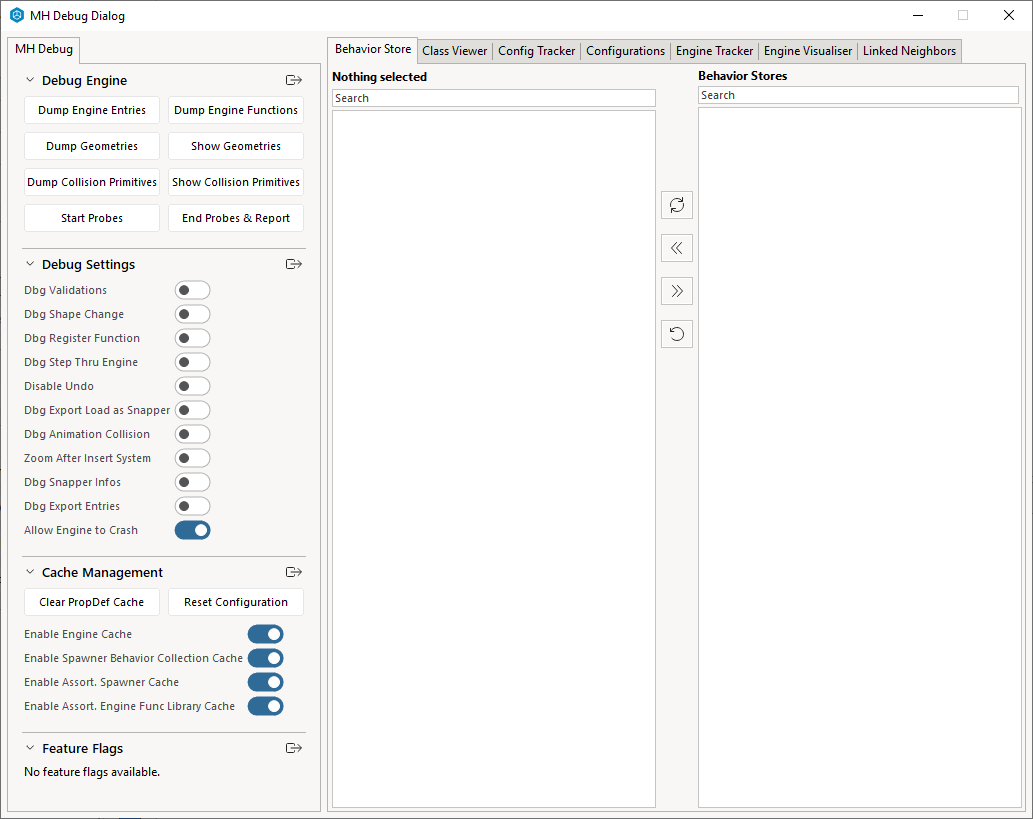
If you wish to register your own debug window within this dialog, you can do so with void mhRegisterDebugWindow(str cardKey, str cardLabel, function(Window):Window func) and void mhUnregisterDebugWindow(str cardKey).
The existing class MhDebugDialog was used to simply build the debug library toolbox. We have re-used this class to be a proper dialog containing all of the debug tools, while still having the library toolbox on the left part of the dialog.
If you wish to register your own debug library toolbox within this dialog, you can do so with void mhRegisterDebugLibrary(Library lib) and void mhUnregisterDebugLibrary(Library lib).
Additionally, several new debug toggles have been added.
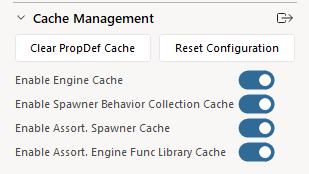
- Enable Engine Cache - exposes
mhEngineCacheEnabled()
This cache is used for a variety of different objects during engine execution (e.g. engine entries, entry layout, spawned snappers, etc).
- Enable Spawner Behavior Collection Cache - exposes
mhSpawnerBehaviorCollCacheEnabled().
Every spawner has a cache statelessCollection of stateless behaviors. Disable this if modifying the behaviors of a spawner to force it to gather new behaviors.
- Enable Assort. Spawner Cache - exposes
mhSpawnerCacheEnabled()
The spawner selector has a cache of classification to spawner. Disable this to force selector to always search for the current best matching spawner, useful when adding/remove spawners or modifying the classification of spawners.
- Enable Assort. Engine Func Library Cache - exposes
mhAssEngineFuncLibCacheEnabled
Every assortment has a cached engine library that is built once and re-used, so engine functions are typically only collected once when the assortment is first constructured. Disable this to always rebuild your assortment's engine library before running the engine. Useful when you have changed the class of an engine function and don't want to modify the cached library or restart your CET instance to refresh the cached library. If utilizing MhAssortment.overrideFunctions, you still need to manually clear it as this toggle doesn't modify that field.
cm.abstract.ofdaXml
Generic Codes and Base Part XML Export
OFDA exports now include a part's generic code as DiscountCategory and as a UserDefined value with type Generic Code. Measurement and user-defined export hooks are called for all Part objects, allowing non-ProdPart implementations to participate.
OFDA XML 04.02.00 Export Compatibility
The Calculations export option is now labeled OFDA XML Purchase Order 04.02.00, and the generated XML has been updated to follow the element structure and ordering expected by the OFDA 04.02.00 schema.
cm.abstract.office
Extensible Type Elevation Merging
TypeElevation now exposes collectMergers() so extensions can control which split type elevations are combined by mergeAll():
Added: extend public void collectMergers(TypeElevation{} mergers)
The default implementation collects split TypeElevation objects. PanelTypeElevation overrides the method to collect only split PanelTypeElevation objects.
Extensions can override the method when their elevation type needs more specific filtering:
public void collectMergers(TypeElevation{} mergers) {
    for (MyTypeElevation elevation in space.snappers) {
        if (elevation.splitKey) {
            mergers << elevation;
        }
    }
}
cm.abstract.part
Material Quantity
ProdPart now provides a shared materialQty(SpecOption specOpt, str adjustmentKey) method. The default implementation returns an existing option adjustment for the supplied key, or 0 if no adjustment exists. Extensions can override this method to supply quantities from their own data or calculations.
Part Dimensions and Special Creation
AbsPart now defines volume(), depth(), height(), and width() as physical measurements in meters. The default value for each method is 0.
ProdPartCreator can now apply option overrides or additions according to its public optionHandling value. The new containsAnySpecials(PropObj) helper checks both part specials and option specials.
cm.abstract.picklist
Readable Picklist Item Values
PicklistItem._partNo and PicklistItem._qty are now public readable, allowing extensions to inspect a picklist item's part number and quantity without adding subclass accessors.
cm.core
cm.core
Added findAllAligned method
The method bool allowAlign(Connector connector, bool aligned=false) is added in the Connector class to check if a connector can be aligned.
public class Connector extends CorePropObj : abstract {
	New: extend public bool allowAlign(Connector connector, bool aligned=false) {
}
The method findAllAligned(Snapper z, AlignedEnv env) is added for finding all connectors that are aligned. Works similar to snapAllAligned. This method would find all connectors that are aligned. These connectors don't need to be connected. This would be useful in situations where connectors need to be aligned but can't be connected like connectors in different sections.
New: public void findAllAligned(Snapper z, AlignedEnv env) {
New: public void findAllAlignedInSetOnly(Snapper z, Snapper{} targets,
				    AlignedEnv env, bool join=true,
				    bool checkBounds=true) {
New: public bool aligned(Connector snap, Connector attach, line ln) {
The class AlignedEnv and AlignedItem were added which is used by findAllAligned to collect aligned connectors.
AlignedEnv has a method AlignedItem tryCreateAlignedItem(Connector s, Connector a) { that can be overridden to further customization, for example filtering out connectors that are aligned but don't meet a specific criteria.
Added afterPropertyChanged to CorePropObj
Added afterPropertyChanged to CorePropObj. This will be called by coreProperties and coreQuickProperties and should allow a class extending from CorePropObj to run code that should be run after property has been changed. if afterPropertyChanged is used for serious undo, do remember to add the ignoreUndo property to the relevant props.
Preserving Part Adjustments When Resetting Item Tags
Snapper now exposes rawParts() and a resetPartItemTagInfos() hook. TaggableSnapper uses these interfaces to identify adjusted parts before resetting user-modified Ind. Tags and to offer adjustment migration when necessary.
cm.core.part
Query Dialog Sidebar and Model Import
The Query dialog now has a collapsible sidebar with separate Import Parts and Import Model tabs. Import Model accepts the model formats supported by Model Lab, previews the selected model, and lets the user align, scale, and rotate it before applying its graphics to the queried object. The user can also revert the object to its original graphics.
Files can be dropped onto either import tab to import them.
Generic Part Codes and Export Data
Generic codes can now be stored directly on PartData and customized through Part or PartProxy:
Added: extend public str PartData.genericCode()
Added: extend public void PartData.setGenericCode(str value)
Added: extend public str Part.genericCode(Space space=null)
Added: extend public str Part.adjustedGenericCode(Space space=null)
Added: extend public str PartProxy.genericCode(Part part)
Part also exposes tag(str categoryLbl, World world=null, bool ignoreCase=false) for category-label lookup. OFDA measurement and user-defined XML hooks are now available on all Part objects rather than only ProdPart objects.
Part Special Handling Helpers
applyCustomParts() has been separated into reusable applyAdditionalParts() and applyOverrideParts() functions. This allows extensions to apply either type of customization independently.
Query Dialog API Follow-up
QueryButton now has an explicit constructor that accepts the standard button arguments plus useFocusRectangle=false. The Query alignment helpers now include alignCenterX() and alignCenter() in addition to alignCenterY().
Model Import Extension Interfaces
The default model-import behavior is available from coreModelImportTabBehavior(). QueryModelImportTabBehavior is public and can be subclassed to customize the model-import workflow:
public QueryModelImportTabBehavior coreModelImportTabBehavior()
public class QueryModelImportTabBehavior extends QueryTabBehavior

public str key()
public QueryTabButton initTabButton(QueryTabBar parent)
public QueryTabWindow initTabWindow(QueryTabContainer parent)
public void initTabWindowEvents(QueryTabWindow tabWindow)

extend public str[] importModelFileFilters()
extend public <str, str>[] getModelFileLabelsAndSuffixes()
extend public void applyGraphicalSpecial(Snapper owner, Snapper graphicsSnapper)
extend public void revertGraphicalSpecial(Snapper owner)
extend public void onModelImportFileChanged(Object sender, Object args)
extend public void onModelApplyBtnClicked(Object sender, Object args)
extend public void onModelRevertBtnClicked(Object sender, Object args)
public void onTabVisibilityChanged(Object sender, Object args)
For example, an extension can replace how imported graphics are applied and supply that behavior through its Query dialog behavior:
public class MyModelImportTabBehavior extends QueryModelImportTabBehavior {
    public void applyGraphicalSpecial(Snapper owner, Snapper graphicsSnapper) {
        // Apply extension-specific graphics handling.
    }
}

public class MyQueryDialogBehavior extends QueryDialogBehavior {
    public QueryModelImportTabBehavior queryModelImportTabBehavior() {
        return MyModelImportTabBehavior();
    }
}
QueryModelImportTabWindow is the public UI counterpart. Its constructor accepts the normal QueryTabWindow arguments plus str[] fileFilters=null. It exposes the following events and overridable methods for file selection, preview management, and button enablement:
public event importFileChanged
public event applyBtnClicked
public event revertBtnClicked

extend public Url getImportFileUrl()
extend public void setImportFileUrl(Url url, bool invokeCB=true)
extend public bool isPreviewing()
extend public void setPreviewSnapper(Snapper value, bool refreshPreview=true)
extend public void refreshPreview()
extend public void refreshPreviewSpace()
extend public void refreshButtonEnablement(bool force=false, bool enable=true)
extend public void importFileChanged()
extend public void applyButtonClicked()
extend public void revertButtonClicked()
To provide a custom model-import window, subclass QueryModelImportTabBehavior and override initTabWindow(QueryTabContainer parent) to construct the desired QueryTabWindow. Call initTabWindowEvents() so the standard model-import callbacks remain connected.
cm.core3D
MultiLinePrimitive3D
Added a new class MultiLinePrimitive3D (moved to core3D from custom.flooring and custom.materialHandling.products.conveyors). This is an in between of LinePrimitive3D and PolylinePrimitive3D, where it is used to draw multiple lines that are not necessarily connected to each other.
cm.test.cmunit.testInstructions
class LockSnapperPositionInstruction
Emulates Right-click on snapper -> Lock Position. In other words, it calls setLocked() on the specified snapper.
class SetViewOrientationInstruction
Sets the view orientation to for example, front, right, left, back or top. Commonly used in combination with SetViewProjectionInstruction and SwitchToViewInstruction(viewOption.threeD).
class SetViewProjectionInstruction
Sets the view projection to perspective, orthogonal or isometric. Commonly used in combination with SetViewOrientationInstruction and SwitchToViewInstruction(viewOption.threeD).
class ValidateAnimationPropDomainInstruction
Validates that the domain of a specified property in the currently active animation, contains the expected members. Complements the existing ValidateAnimationPropValueInstruction.
cm.win
Preserving Part Adjustments When Resetting Item Tags
An overload of makeYesNoDialog() now uses FlexDialog and supports a dialog icon and formatted question text:
Added: public int makeYesNoDialog(Window parent, str label, str question,
                                  int defaultButtonNo=1,
                                  dialogIcon icon=dialogIcon.none,
                                  bool formatText=false,
                                  function(Window dialog) positionCallback=null)
UrlField button background brush
UrlField now exposes extend public Brush buttonBgBrush(). Override this method to customize the browse button's background, including hover or selected-state highlighting, without replacing drawUrlButton().