
Icon Library Updates
Icon Library Updates
The icon library has been reorganized to improve consistency and make icons easier to find and maintain. Developers must update references to icons that were removed, moved, or renamed. References using outdated names or paths may no longer resolve, resulting in missing icons.
Renamed icons with their previous and new names
Old: Systemwide/Query-history
New: Systemwide/Search-history

Old: Extension-specific/Remove-hole
New: Extension-specific/Remove-opening

Old: Extension-specific/Create-hole
New: Extension-specific/Create-opening
cm.abstract.dataSymInterface
External Reference Key (E-KEY) matching behavior update
From 17.5 onwards, we are adding support for both AND and OR matching condition when multiple External Reference Keys are used to match a Product's External Reference. As a result, the fundamental logic for finding matching External Reference using E-KEY is completely reworked.
Enabling DSI constraints logic
The new DSI constraints logic will be enabled by default in the 17.5 Major release.
The logic has been rewritten to better support both CET and Stage, allowing them to share the same backend for improved consistency.
There should be no behavioral differences between the old and new constraints logic. However, if you encounter any broken or unexpected behavior after enabling the new DSI constraints logic, please report it to Dev Support.
As a temporary workaround, you can override the forceDsApplyLogic() method in the DsPData or DsPDataProxy class to fall back to the old constraints logic.
Note: Abstract OFML will continue to use the old constraints logic because its implementation was customized based on the old logic and has since diverged from the standard DSI constraints implementation.
cm.abstract.dataSymbol
COM Reworks to support Mid-Level application
For a long time, COMs were only able to be applied to leaf features (features that didn't have another feature under any of it's options. With 17.5, changes have been made to support application of COMs to any feature that has a material associated with it. Previously, COM support was handled by the UI and as such, each UI that interacted with Features/Options had to implement support for showing COMs and applying them. In 17.5, this is almost entirely handled by DsDomain and DsPFeatureTVI/DsPMaterialTVI. Most of the changes have been in the behavior of the classes and the removal of special handling for COMs. Migration should only be needed if you relied on the structure of treeOwner on the DsPFeatureTVI and DsPMaterialTVI classes and/or subclasses of DsCOMMaterialCard and DsMaterialDialog.
Order Option Export
Order exports now build an option tree before writing Configura SIF or OFDA XML. The selected-option map alone does not contain entries for unselected optional options, and the former export traversal missed subfeatures below selected optional options. The new DsOrderExportOptionInfo tree includes both no-code entries and selected options with their descendants so both formats can export the complete hierarchy.
cm.abstract.draw
A few unused and legacy classes have been removed from this package to simplify the codebase and improve maintainability.
cm.abstract.ofdaXml
OFDA XML 04.02.00 Export Compatibility
OFDA XML exports now preserve part attribute notes and descriptions in separate elements that can be imported correctly by Spec. Several line-item, option, and specification elements have also been reordered for schema compatibility.
The export format is labeled 04.02.00, but the root Envelope continues to contain SchemaVersion="04.00.00". This is intentional for the 04.02.00 schema and is not the version displayed in the Calculations export menu.
OFDA XML part ordering and group traversal
OFDA XML order-line generation now follows the calculated part sequence directly. It no longer re-splits each calculated row by category before writing individual parts, and structural PartGroupNodes are traversed without producing an empty order line for the group itself.
cm.abstract.office
Extensible Type Elevation Merging
TypeElevation.mergeAll() previously searched specifically for PanelTypeElevation objects. As a result, merge did not work correctly for non-panel systems extending TypeElevation.
mergeAll() now delegates candidate selection to collectMergers(). This allows the base class to support non-panel type elevations while retaining panel-specific behavior in PanelTypeElevation.
cm.abstract.part
Material Quantity
17.5 introduces initial CM support for material quantities. dataSymbol parts can now read quantities supplied by catalogs, and extensions can build on the shared part method to supply any additional quantities they need. Further improvements are planned for the next major release.
Query Dialog Sidebar and Model Import
The product-part Query implementation now supplies its import support through a specialized QueryPartImportTabBehavior. This keeps part file import and option drag/drop behavior while integrating it with the new Query dialog sidebar.
Part Dimensions and Special Creation
Physical dimensions, generic codes, and XML export hooks are being moved toward the common part APIs so non-data-symbol parts can participate in the same SIF and OFDA workflows. Product-part creators now share the option-processing implementation used for override and addition specials.
cm.abstract.part.query
Multiline Query and Article View Text
The option-special dialog now provides a multiline description area so long option descriptions can wrap instead of expanding the dialog horizontally. This complements the related part-special dialog and query tooltip changes in cm.core.part.query.
cm.application
Separate menu entries for horizontal and vertical split views
The Views menu now has separate entries for horizontal and vertical split layouts.
cm.core
cm.core
PropInputSetting of "persistent"/"persistant" prop arg only applies on Insert Animation
The "persistent"/"persistant"=true prop arg in PropInputSetting was meant to be a quick implementation of setting the same value of a prop as the previous inserting same class Snapper.
Example:
- Press worksurface inserting button.
- Inserting 1st worksurface, default width is 60cm.
- Change width to 120cm.
- Click to actually place the worksurface.
- 2nd worksurface now inserting with 120cm width.
The "persistent"/"persistant" logic is also happening while stretching Snappers which makes no sense according to the original intent. Therefore "persistent"/"persistant" will now be executed only in insert animation (Previously happening to all animation properties).
Split-view Resource Label
The single label previously used for split views has been replaced with separate labels for horizontal and vertical layouts. This allows each split-view option to be clearly identified in the user interface.
Removal of Legacy 2D and 3D Contextual View-Switch Toolbar Models
The legacy contextual view-switch toolbar models have been removed as part of the split-view toolbar update.
Split-View Orientation and Divider Interface Changes
Split views now support both horizontal and vertical layouts. The split-view API has been updated so that horizontal consistently means views stacked top/bottom and vertical means views arranged left/right.
Preserving Part Adjustments When Resetting Item Tags
Resetting item tags on a TaggableSnapper now handles each part's user-modified Ind. Tag explicitly. If resetting those tags would change the keys of existing part adjustments, CET preserves those adjustments automatically by default. Calls using silent=false identify the affected article codes and ask whether the adjustments should be preserved. See the Late update after RC Freeze notes below.
cm.core.calc
Multiline Query and Article View Text
Article-view information rows now honor the existing Use newline setting consistently, including text supplied by PartInfoColumn and BasicPartInfoTreeColumn implementations.
cm.core.part
Query Dialog Sidebar and Model Import
Query dialog side tools are now represented by QueryTabBehavior and QueryTabWindow objects managed by a QueryTabContainer. This replaces the single-purpose rightWindow and moves part-import behavior out of QueryDialogBehavior into QueryPartImportTabBehavior.
Extensions that customize the Query dialog can return additional tab behaviors from QueryDialogBehavior.tabBehaviors() or replace the standard part/model import behaviors by overriding the corresponding behavior factory method.
Part Owner Identification
In 17.0 sourceId was introduced at the core level to give parts a snapper specific unique identifier to help identify the owning object and ItemTag associated with the part. A gap was found from the changes where merged parts didn't have enough information to link changes from a part back to all ItemTags across all owners of the part. The main issue was that itemTagKey could be changed to not be the sourceId in a customization. To help solve this issue, PartSouceInfo was created as an object to own all the unique information that identifies the part. Currently this is Snapper owner, str sourceId, and str itemTagKey.
Preserving Part Adjustments When Resetting Item Tags
Resetting a user-modified Ind. Tag can change a part's adjustment key. CET now detects adjusted parts before the reset and can migrate their adjustments to the new key. This prevents price, quantity, and other part adjustments from unexpectedly becoming orphaned when an Ind. Tag returns to its default value.
cm.core.part.query
Multiline Query and Article View Text
Part-special descriptions are now edited in a multiline area. Long query-cell tooltips are also split into shorter lines so they remain readable without producing excessively wide tooltips.
cm.core.settings
Default Template Folders Follow the CET Documents Location
The default Drawing Templates and XClip Templates folders now follow the configured CET Documents location instead of the original system-default CET Documents path.
Paths that users explicitly customized are preserved and do not follow changes to the CET Documents location.
cm.core3D
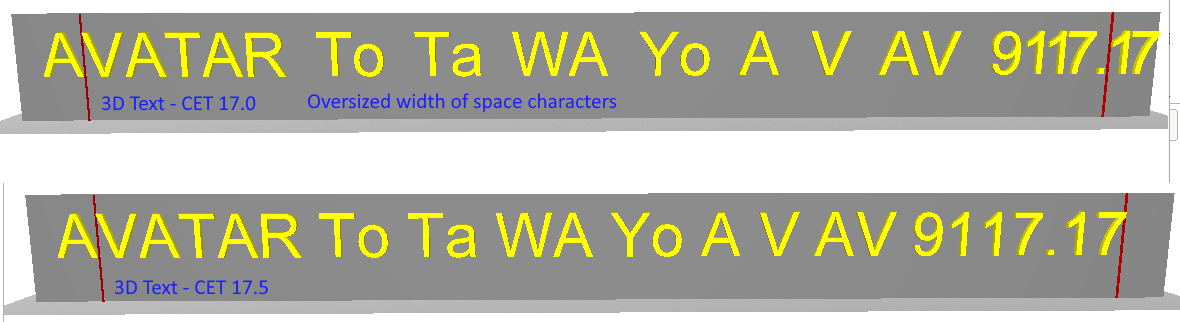
Improvements to 3D text spacing
3D text built through Text3D now gets character spacing from glyph advance data instead of deriving spacing from each character outline's maximum x extent.
In practice this makes 3D text spacing better match 2D text, especially for strings containing whitespace. The change is most noticeable in snappers that build meshes from text outlines, such as 3D Text.
cm.std.draw3D
Many unused classes and functionality have been removed from this package to simplify the codebase and improve maintainability.
cm.std.print.template
Many unused classes and functionality have been removed from this package to simplify the codebase and improve maintainability.