
Ind Tags
Ind. Tag text only splits rows when there is real tag data
finalFlattenableKey() and the Ind. Tag calculation column now use Part.itemTagsKey() for the tag-text part of the key. If there is no item tag data to append, no Ind. Tag suffix is added.
This avoids unnecessary row splits and avoids "repairing" saved adjustments when the old and new keys are effectively the same. If you depended on every part getting an Ind. Tag suffix whether or not it had real tag data, re-test that logic.
Adjustment migration now checks each loaded space
Older single-part adjustments are now repaired per Space instead of only through the main space/global setting path. CET marks each loaded space that has pre-17.0 part adjustments, repairs matching SinglePartAdjustment keys after merge finalization, and clears the space flag afterward.
The repair only runs when the part's legacyFinalFlattenableKey() matches the saved adjustment key and that legacy key differs from the current finalFlattenableKey(). That keeps the migration from moving adjustments that do not actually need to move.
MR 3 fixes a real old-drawing case where user-modified Ind. Tags on sub-objects could be lost during load. The fix is the new legacyItemTagKey() path. Data symbol parts implement a default legacy key, and packages with older custom key history, such as Fika, add package-specific overrides.
If your package generated old Ind. Tag keys from frame names, creator keys, option paths, or any other custom sub-object identity, add and test legacyItemTagKey().
cet.runtime
Login
CET no longer remembers the user's credentials. The responsibility of authenticating the user is now delegated to our Single Sign-on service.
BITS
BITS is no longer initialized on CET startup.
cm.abstract.dataSymbol
DsAPIPData which is the data used for snappers imported from stage has been removed. Stage snappers will now use DsPData which is used by regular catalogue symbols to be more consistent with CET catalogue symbols.
Component Tab File Format (*.cmtbxc) End of Life
As part of the EOL effort, the Component Tab file format (.cmtbxt) will also be retired and no longer be loadable as the streamed Component Tab class packages are removed. Ideally the Component Tab interfaces should only be streamed as part of the cmtbxt file format, and should not (and is not supposed to) be streamed with other cm file format (e.g., drawings, favorites). However, if the classes were somehow streamed as part of other file format, a new PackageStreamRenamer class is introduced to redirect these missing classes to a temporary placeholder class. Do note that this class serves no meaningful purpose, as it merely exists to suppress or bypass any load failure/errors caused by missing Component Tab related packages.
In developMode, the renamer will print extra info and a short stack dump so that it won't go fully unnoticed.
In cm.abstract.dataSymbol.renamer.cm:
/**
 * Stream renamer for removed toolbox creator package (cm.abstract.dataSymbol.ui.toolboxCreator).
 * which was permanently removed starting 17.0.
 *
 * Handles and redirect the streamed objs to a dummy class so it does not crash CET.
 */
private class DsToolboxCreatorRenamer extends PackageStreamRenamer {
    public void type(version v, Symbol pkg, Str name, Str fileName=null) {
	if (pkg.v == "cm.abstract.dataSymbol.ui.toolboxCreator") {
	    if (developMode) {
		pln("Attempting to load Component Tab interfaces!".eAngry; #pkg; #name);
		stackDump(3);
	    }

	    pkg.v = "cm.abstract.dataSymbol";
	    name.v = "DsDummyTBCreatorStreamPlaceHolder";
	}
    }


    /**
     * Deprecate old packages.
     */
    final private void deprecateOldPackages() {
	// Used to deprecate packages info stored in drawings to avoid load warnings about missing packages
	if (StreamRenamer r = globalStreamRenamer) {
	    r.deprecatePkg((#"cm.abstract.dataSymbol.ui.toolboxCreator"));
	}
    }
}


/**
 * Placeholder for streamed classes from 'cm.abstract.dataSymbol.ui.toolboxCreator'.
 */
public class DsDummyTBCreatorStreamPlaceHolder : unstreamable {
    /**
     * Load failure event.
     */
    public loadFailedResult loadFailed(ObjectFormatter formatter, LoadFailure failure) {
	return loadFailedResult.ignore;
    }
}
Data symbol Ind. Tags now use sourceId()
DsPart.sourceId() now resolves a stable identity in this order: super(), DsPData.dataId, DsPData.styleNr(), then article code. This is the identity used by the new core Ind. Tag and user-tag migration system.
DsPart.uniqueKey() no longer includes user-modified ItemTagInfo state. If your extension relied on customized Ind. Tag text to make data symbol parts unique, provide a stable sourceId() instead.
DsPart.legacyItemTagKey() is used only for loading older drawings. The new runtime identity is still sourceId(), but the legacy hook keeps 16.5-era user-modified tags from being lost when the old key was based on data id, style number, article code, or a package-specific sub-object key.
Legacy picklist tag data is migrated on load
DsPicklist.loadFailed(..) now migrates the removed tagInfos and tagInfoKeys storage into the shared UserTagInfoHolder. This also reconstructs user-modified tag text for tags that were saved but were not actively materialized when the drawing was last open.
Removing a picklist item now removes related user-tag info
When a DsPicklistItem is removed, related user-modified Ind. Tag info is cleared from the shared holder instead of lingering on the picklist.
Picklist quantity input now accepts comma decimals in freeform Catalogue Explorer
The quantity column in the freeform Catalogue Explorer picklist now accepts both , and . as decimal separators through the custom numeric input field used by DsPicklistQuantityGridCell.
This aligns the picklist quantity editor more closely with Calculations. Entering a value such as 1,2 should now preserve the decimal quantity instead of truncating everything after the comma.
DsPart option specials now belong in per-part OptionSpecialHolder
At runtime, DsPart option specials are no longer supposed to remain in the owner snapper's shared PartSpecialHolder.
They now belong in the per-part OptionSpecialHolder keyed from the part's sourceId(), just like other ProdPart option specials.
This matters for data-symbol packages because legacy DsSpecOption keys were not the same as base SpecOption keys. If you load older drawings without opting in to the right migrator, option specials or added options can be lost even though part specials still survive.
DsPart exports now include added options through anchor traversal
DsPart.xmlOptions(...), DsPart.xmlAdditionalOptions(...), and DsPart.generateAdditionalOptions(...) now work with the 17.0 added-option model. Instead of assuming only catalogue-selected options exist, these flows follow the option anchor chain and include inserted custom options in XML and PMX item data.
If your package overrides export behavior, make sure it does not silently ignore added options that now live behind getFollowingCustom(...).
Root-level added options are anchored with cRootKey, so export code that only looks for options following normal catalogue options can still miss valid added options.
OFDA/XML export now writes data-symbol base price data
Data-symbol OFDA/XML export now participates in the shared Part.xmlUserDefined(...) price-export flow. OfdaXMLOrderLineDsProxy writes the part base price through cBasePriceTag, and DsPart continues to export option data through the 17.0 added-option-aware XML helpers.
Data-symbol prices now translate to the current CET currency in shared outputs
For core data-symbol parts, base price and option pricing now follow the current CET currency setting more consistently. That affects shared BOM-visible outputs such as Calculations, query dialogs, print/report flows, article-view style UI, SIF export, and OFDA/XML export where those values are shown or exported.
This is a migration point for manufacturers. Packages that previously relied on untranslated data-symbol prices, or that added their own manual currency conversion, should verify pricing in both default-currency and non-default-currency scenarios.
Package count now uses the shared core column and export path
The older data-symbol-specific package-count column registration is removed in favor of the shared core PackageCountColumn. Data-symbol parts still provide the actual count through DsPart.pkgCount(), but OFDA/XML and part-detail export now rely more on the shared core package-count path.
Older saved references to cm.abstract.dataSymbol.partColumns package-count and preview column types are redirected through the renamer to the shared core column types during load.
DsPartSpecialMigrator handles legacy data-symbol option keys
DsPartSpecialMigrator translates the older data-symbol option-special key formats into the new per-part holder layout.
That includes the older DsSpecOption key forms and the feature-option combinations that were previously flattened into the shared holder key.
During load, the discovery path is:
Snapper.loaded1()callsinitPartSpecialMigrator(formatter)initPartSpecialMigrator(...)checks whether the snapper already has a non-emptyPartSpecialHolderand whether the loaded package version is older than the current runtimegetPartSpecialMigrator(init=true)then resolvesthis."partSpecialMigrator", calling the prop default if needed- the migrator is marked with
pendingMigration = trueand the loaded package version - later,
Snapper.migratePartSpecials(parts)callsmigrateSpecials(parts, this)
Because the migrator is opt-in, catalogue packages should verify older drawings that contain:
- option specials
- additional custom options
- data-symbol-specific option adjustments
- package-specific
DsPartkey histories
DsPData now has explicit added-option export hooks
DsPData.generateOptionRows(...) and generateAdditionalOptionRows(...) are the new SIF-export helpers for both normal and added options.
If your package customizes SIF export, review those hooks so that added options remain visible in exported data.
cm.abstract.ifc
Control of using a snapper's sym representation for IFC export delegated to IfcCoreFactory.
IFC export was using a snapper's sym representation to generate the IFC geometry of the IFC symbol. This was because sym supports geometries such as extrusions, which can be exported as solids. However, due to how certain SymNodes were generated, this resulted in compound solids which cause the geometries to go missing when viewed in certain IFC viewer softwares (such as Solibri and Revit) due to the rendering rules of those softwares. Defaulted this now to export using the snapper's mesh instead to improve the consistency of the visibility of IFC symbol geometries in IFC viewer softwares. However, if a manufacturer wishes to still export their snapper using the sym based representation (possibly to export as a solid), they can override extend public bool useSymBasedRepresentations() method in IfcExportCoreObjectFactory to return true.
cm.abstract.materialHandling
Unit load absorption load code
In 17.0 Major we have fixed an issue involving level snappers inserted without any unit loads. They do not have a MhSnapperBehavior in its stateBehaviorCollection field after insertion. The problem is that after inserting a UnitLoad onto a level, it does not get absorbed as a MhSnapperInfo due to the level missing the MhSnapperBehavior, and this behavior does not get initialized for existing levels.
We have since fixed it to start initializing MhSnapperBehavior when needed, and to ensure old drawings are handled we added this load code. If you have a custom level shape class that does not extend from MhLevelShape, you will need to copy the below code into your class.
public class MhLevelShape extends MhBoxSnapperShape {

    public void loaded1(ObjectFormatter formatter, LoadFailInfo failInfo) {
        super(..);
        mhUnstreamStoredSpec(formatter);

        // CETC-134365.
        if (formatter.version(#:package) < version(17, 0, 0)) {
            if (owner and !owner.snapperInfosBehavior()) {
                if (MhSystemConfiguration config = owner.configuration()) {
                    forChildren(MhSnapper child in owner) {
                        if (config.exportAsBehavior(child.classification)) {
                            owner.initSnapperInfosBehavior();
                            break;
                        }
                    }
                }
            }
        }
    }
}
Selection behavior in accessories
The following spawners have had the mhRowChildSelectionBehavior added to them. This changes their group selection behavior such that the row is no longer included in the selection when the accessory is selected. You may need to exclude this behavior if your custom class already appends a selection behavior.
- MhCornerProtectorSpawner
- MhDepthBeamSpawner
- MhFlankProtectorSpawner
- MhNamePlateSpawner
- MhUprightProtectorSpawner
- MhLevelAccessorySpawner
Bay editor frame override material key change
The bay editor has a material override applied to the frames. The key used for this override has changed.
Old:
private void overrideFrameMaterial(Snapper snapper, REDOverrideMaterial mat) {
    ...
    const str key2D = "overrideMaterialVessel2D";
    ...
    const str key3D = "overrideMaterialVessel3D";
    ...
}


New:
private void overrideFrameMaterial(Snapper snapper, REDOverrideMaterial mat) {
    ...
    const str key2D = "mhElevSpaceOverrideMaterialVessel2D";
    ...
    const str key3D = "mhElevSpaceOverrideMaterialVessel3D";
    ...
}
cm.abstract.office
There is no default shared office electrical insertion/routing behavior anymore
Packages that previously relied on the old InsertElectricalObject animation and PanelFrame callbacks will not get equivalent behavior automatically in 17.0.
If you do nothing, that shared behavior is simply gone.
For existing manufacturer packages, the expected behavior-preserving migration is usually:
- copy the removed office electrical interfaces and behavior into your own package
- update your panel and junction classes to call those package-local interfaces
- keep your existing placement/routing model unless you specifically want to redesign around node/path routing
custom.fika shows a different, more structural 17.0 option:
FODataElecSnapperexposesappendElectricalAlternatives(...),getSnappingNodes(...),getAvailableNodes(),getNeighborNodes(...),appendNodesToPath(...), andalreadyRoutedTo(...)FOElecNodesubclassesAOElecNodeand delegates those routing decisions back to the owning electrical snapperFOElecPathAnimationandFOElecPathFinderreplace the old insert/apply/remove workflow with routed path creation
That Fika approach is useful when you want the new routed electrical system, but it should be treated as a redesign path, not as the default migration expectation for every manufacturer package.
cm.abstract.part
class AbsTagPartColumn
The Ind. Tag column is now splittable by user-modified Ind. Tag text. This keeps calculation rows separated when the underlying part number is the same but the user override text differs.
value(..) now uses Part.itemTagText() and isAdjusted(..) now checks Part.isUsrModItemTagInfo(), so only explicit user overrides are treated as adjusted values.
splitKey(..) now delegates the tag-specific key work to Part.itemTagsKey(). If the part has no real item-tag data, the split key stays empty instead of adding a placeholder Ind. Tag suffix.
This split/merge behavior is accomplished through the updated cm.core.part.Part.finalFlattenableKey() behavior, not just column logic. Because part adjustments are tied to the final flattenable identity used during merge, any extension with saved or custom part-adjustment flows should test those workflows with user-modified Ind. Tags.
Row-level Ind. Tag adjustments are now applied per part
indTagAdjustmentHook(..) is now registered through partRowAdjustmentApplyHooks. When the adjusted column is AbsTagPartColumn, the current value is applied to every part in the row and the temporary PartColumnAdjustment is removed afterward.
Legacy single-part adjustments are remapped after merge finalization
fixCET17Adjustments(..) now runs from appendPostFinalizeAfterMergeHook(..) and restores older single-part adjustments that were saved with the pre-17.0 flattenable key format. This is mainly relevant when opening 16.5-and-earlier drawings that contain user-modified Ind. Tags or other single-part adjustments.
The repair is now per loaded Space. CET marks spaces with old adjustments during load, checks each marked space after merge finalization, and clears the marker after processing. It only rewrites an adjustment when legacyFinalFlattenableKey() matches the saved adjustment key and that legacy key is different from the part's current finalFlattenableKey().
class ProdPart
When calculation or ExtendedPartData imports contain an indTag, ProdPart now routes that value through setUserItemTagInfo(..) so it participates in the new shared user-tag storage and reset-behavior system.
Product parts now distinguish base options from inserted custom options
allPartOptions() now includes custom inserted options and is used by more export and query flows. This means code that previously assumed options() and the effective option sequence were the same may now see different behavior when custom options have been added.
Option specials are now stored per part in OptionSpecialHolder
Before 17.0, both part specials and option specials were stored together in the owner snapper's PartSpecialHolder, and option-special keys were composed from the part key and option key.
In 17.0, each part instead gets its own OptionSpecialHolder, stored on the owner under optionSpecialHolderPropKey(part), which includes the part's sourceId().
The practical effect is:
PartSpecialHolderremains the owner-level holder for part specials, overrides, and part additionsOptionSpecialHolder.specials()now stores only that part's default-option specialsOptionSpecialHolder.additions()now stores only that part's additionalCustomOptionSpecials- option-special lookup is now anchored to stable part identity plus the option's own
key()
If your extension still inspects the snapper-level PartSpecialHolder.specials() map for option specials, migrate that code to OptionSpecialHolder and the ProdPart helper APIs.
Older option-special data requires migration on load
When loading pre-17.0 drawings, old option specials can still exist in the shared PartSpecialHolder under legacy combined keys.
ProdPartSpecialMigrator exists to read those old entries, move them into the new per-part holder, and then remove the old keys.
This migration is not automatic for every package. If your package used package-specific part keys or option keys, or if it persists older drawings that must preserve option specials and additional options, you need to opt in to the migrator flow and override the key-conversion methods as needed. In practice, CET discovers the migrator through the owner snapper's partSpecialMigrator prop/default and then invokes it from the snapper load path.
anchorKeyToCustom now drives ordering for added options
Added options are no longer just an unordered bag of CustomOptionSpecials.
CustomOptionSpecial.anchorOptKey identifies which option or added option a custom option follows, and ProdPart.anchorKeyToCustom caches that relationship after insertCustomOptions(...) rebuilds the effective option sequence.
This is important because the cache is used by downstream export/import and query flows to preserve added-option order:
- query import and drag/drop add options by updating
anchorOptKey DsPartOFDA/XML export usesgetFollowingCustom(...)to emit custom options after the correct anchor optionDsPDataSIF and PMX export usegetFollowingCustom(...)to generate additional option rows in the correct order
If you create or reorder additional options yourself, make sure you invalidate and rebuild part options so the anchor cache is refreshed before exporting or reading back option order.
OFDA/XML export now writes base price and option-list price data
The 17.0 OFDA/XML export flow now uses Part.xmlUserDefined(...), ProdPart.xmlUserDefined(...), and package-specific overrides such as DsPart to write additional pricing data into exported XML.
For product parts, option-list prices are exported through cOptionListTag. Base price export is handled through the shared cBasePriceTag path in Part.xmlUserDefined(...).
Older drawings with both part adjustments and option specials can lose a part adjustment
As part of the 17.0 OptionSpecial cleanup, the old originalPart / originalOptStr flattenable-key path was removed. A practical consequence is that some older drawings that contain both a part adjustment and an option special on the same effective part can lose the part adjustment after load because the persisted adjustment key no longer resolves the same way.
This is most relevant for packages that saved older drawings with mixed part-adjustment and option-special state. Those flows should be tested explicitly when validating 17.0 migration behavior.
ProdPartAddition and ProdPartOverride are applied during Snapper.fetchParts()
The creator objects are stored on the owner first, but they do not affect calculations until the owner later calls fetchParts().
At that point the core flow calls applyCustomParts(this, localParts) after getParts(...) and afterGetParts(...), which is where additions and overrides become real generated parts.
For product parts, that means:
ProdPartAddition.part(owner)generates aProdPartand turns its storedPartOption[]into additionalCustomOptionSpecials in that part'sOptionSpecialHolderProdPartOverride.part(owner)generates aProdPartand applies its storedPartOption[]directly withsetPartOptions(...)- only then are the generated parts merged into the owner's fetched local part list
This matters if you are debugging calculations, query dialogs, or exports and expect a stored creator to have immediate effect before fetchParts() has run.
Additional options are now first-class runtime data
Custom option additions are now stored and ordered explicitly through anchor keys. This allows imported or user-added options to be inserted after specific existing options and preserved in query/import workflows.
If you rely on option order, option export, or custom option persistence, test those flows with added options and anchor-key updates.
Option customization state now includes additions and inherited overrides
At runtime, a product-part option can now report:
specialadditionoverridewhen the owning part is overridden
This affects query-grid highlighting and any extension logic that uses option customization state to decide visibility or behavior.
cm.abstract.part.import
Runtime behavior overview
The abstract import layer changes visible import behavior by producing ProdPart instances and option data through the shared query import workflow.
Product-part query import now uses the new environments
ProdPartQueryDialogBehavior.getImporterEnv(str suffix) now returns:
ProdPartSIFImporterEnv(silent=false)for.sifProdPartPMXImporterEnv(silent=false)for.pmxProdPartOFDAImporterEnv(silent=false)for.xml
That means package-specific ProdPart import behavior should usually be implemented by subclassing one of these environments or by overriding the relevant ProdPart import hook, not by bypassing the query import flow.
SIF import now builds ProdPart options during import
ProdPartSIFImporterEnv tracks both the current part and the current option while parsing the file. When it sees headerOptionKey() (ON by default), it starts a new option, collects option fields into a SpecOption, and appends all flushed options to the part in flushPart(...).
If your older import code assumed SIF import only produced base part data, update that assumption. In 17.0 the abstract import layer can produce product-part option data directly from the imported file.
OFDA XML import can now populate product options
For imported OFDA XML, ProdPartOFDAImporterEnv creates ProdPart instances and ProdPart.importOFDASpecItemTag(...) now routes <Option> and <CustomOption> children into importOptionTag(...).
This is the shared path that now builds imported SpecOption objects from OFDA XML, including nested options. Packages that need to customize OFDA option import should override importOptionTag(...) or extend importOFDASpecItemTag(...) accordingly.
cm.abstract.part.query
Imported option items in query dialogs
Product-part query dialogs now support importing option items as well as parts. Imported option items can be shown in the import pane and dragged into valid option rows in the query grid as additional options or special overrides.
This is the abstract-part side of the broader query import workflow introduced together with cm.core.part.query.
Option row visibility and highlighting
Option rows are now filtered through acceptPartOpt(...).
Options that are top-level features (have a level of 0) are filtered out of the Query Dialog.
Options that are special, additional, or part of an overridden Part are kept visible.
Option and product-part rows now use customization-based highlighting similar to the core query package:
- specials use the existing cyan highlight
- overrides use a light green highlight
- additions use a purple highlight
If you rely on previous option-row visibility or row-color assumptions, verify the updated behavior.
Additional option specials
The data environment now supports creating, anchoring, reordering, and removing additional option specials (CustomOptionSpecial) directly from query import and drag/drop operations.
Removing an added option can also update anchor keys on neighboring added options.
If you have custom code that inspects or persists option special ordering, verify it against the new anchor-key update behavior.
Option-special currency handling
OptionMakeSpecialDialog now converts the amount shown in the dialog from calculation currency back to the part's main currency before storing the final OptionSpecial or CustomOptionSpecial.
If you compare displayed amounts to stored option-special values, account for this conversion.
cm.core
cm.core
Snapper.loaded1() now initializes migration helpers
For packages that opt in to the new migration flow, the discovery path starts in cm.core.Snapper:
Snapper.loaded1()callsinitPartSpecialMigrator(formatter)initPartSpecialMigrator(...)checks whether legacy specials exist and whether the loaded package version is older than the current runtimegetPartSpecialMigrator(init=true)resolves the snapper'spartSpecialMigratorprop/default- the migrator is marked pending and later run through
migratePartSpecials(parts)
This is the runtime entry point that downstream packages such as custom.fika depend on when they provide FikaDsPartSpecialMigrator() through the snapper prop.
Snapper.loaded1() also calls initPartAnnotationMigrator(formatter). For drawings loaded from before 17.0, core only creates the annotation migrator when the snapper already has annotations to migrate. When parts are constructed, PartAnnotationMigrator remaps old annotation keys to the part's sourceId().
snapper.cm
The drawFeatures(..) method has been changed so that features for the 3D view are now generated from the snappers 3D mesh instead of using the same features as for the 2D view, which were often not accurate in 3D space. The method can be overriden to define a custom behaviour.
New Behavior
- If in 2D view and the snapper overrides
drawFeatures→ Use the override - If in 2D view and the snapper does not override
drawFeatures→ Take features based ondrawGraphs(2D graphics) - If in 3D view and the snapper overrides
drawFeatures→ Use the override - If in 3D view and the snapper does not override
drawFeatures→ Add features based on 3D mesh
Old Behavior
- If in 2D view and the snapper overrides
drawFeatures→ Use the override - If in 2D view and the snapper does not override
drawFeatures→ Take features based ondrawGraphs(2D graphics) - If in 3D view and the snapper overrides
drawFeatures→ Use the override - If in 3D view and the snapper does not override
drawFeatures→ Take features based ondrawGraphs(2D graphics)
Core Snappers Overriding New Behavior
Some core snappers override drawFeature in order to retain the old behavior. The reasons for this vary, but one example is lines where we want it to snap to the mathematical (infinitely small) line rather than to the cylindrical mesh of the line.
The following snappers have overriden the behavior:
- Ceilings
- Walls
- Windows
- Doors
- Custom shapes
- Lines
Required Developer Actions
- If one of your snappers relies on the old behavior:
- Test it and verify how it works. To restore the old behavior, override
drawFeaturestoreturn drawGraphs(..).
- Test it and verify how it works. To restore the old behavior, override
- If one of your snapper's 3D model is not accurate to its real-world measures:
- Override
drawFeaturesand define your own more accurate features.
- Override
- If one of your snapper's already override
drawFeaturesorsystemDrawFeatures:- Verify the override produces the desired output. If not, either update the override or remove it to use the new default 3D features based on the mesh.
In general, it's recommended to test the feature snapping of your extension and ensure it's working as expected. For example, check if the measure tool can be used to accurately measure the dimensions your objects.
Check Drawing moved to the Tools menu
The System Validation dialog is now exposed as Check Drawing from the Tools menu and is backed by the new cm.core.invalidListCB() callback.
cm.core.calc
New standard-special behavior in Calculations
CET 17.0 introduces a new standard-special system in cm.core.part. Standard specials are internal specials rather than user-created specials, so part rows that only contain standard specials are not highlighted as user-special rows in Calculations.
This follows the new Part.containsAnySpecials(ignoreStandardSpecial=true) behavior used by calculation row highlighting. Implementers should treat that as part of the intended standard-special behavior, not as a loss of ordinary special highlighting.
New setting for summation label on summary sum lines
Calculations now has support for showing or hiding summation type labels on summary sum lines in 17.0. This affects calculation summaries, summary templates, article view preview, and printouts.
Sum lines now use a user-facing summary setting to decide whether labels such as Sell, Buy, List, or Profit are appended to the sum name.
For 17.0, this setting defaults to enabled so existing summaries and printouts will continue to show summation labels unless explicitly turned off.
This behavior is controlled through ArticleViewSummarySettings.enabledSettings using the key cSumLabelSettingKey ("summationLabels").
Older saved summary settings that do not contain this field load successfully and use the 17.0 default of true.
If you have custom code that compares summary labels literally, parses printed summary text, or depends on the exact displayed name of a GlobalPartAdjustmentSum, verify that it still works when summation labels are shown or when users disable them.
cm.core.collabG3
Extensions that create part tags and part tag categories on a new drawing using hooks such as createWorldHooks() and selectWorldHooks() are required to assign a fixed unique ID onto the Extension's default created custom PartTags and PartTagCategorys. Otherwise, loading CollabPro projects might result in duplicated part tag categories.
cm.core.nwd
As cm.core.nwd has been removed as a seperate extension, it is nolonger possible to list it as an extension dependency.
If your extension.xml includes a dependency on cm.core.nwd this should be removed.
cm.core.part
Base and option prices now translate to the current CET currency in more BOM-visible outputs
The shared core pricing flow now translates base prices and option upcharge prices to the current CET currency more consistently. In practice, this affects BOM-visible areas such as Calculations, query dialogs, print/report flows, article-view style part presentations, and order/export paths that rely on the shared pricing APIs.
This can require migration for manufacturers. If your extension overrides basePrice(...), optionPriceSum(...), upcharge(...), listPrice(...), totalListPrice(...), supportsDefaultCurrency(...), or related export helpers, validate that prices still come out correctly when the CET currency differs from the part's default currency.
Ind. Tag reset behavior is now configurable
The new core part settings support three reset modes:
- Legacy reset behavior
- Part Number changes
- Part Number and Option changes
Switching between these modes converts existing user-modified Ind. Tags to the new keying structure so user overrides are preserved.
Old drawings are migrated automatically
When drawings from 16.5 and earlier are loaded, CET now:
- migrates user-modified Ind. Tag info into the new user-tag holder format
- remaps AN/AD annotations from legacy part keys to
sourceId() - restores single-part adjustments that were saved with the legacy final flattenable key
- uses
legacyItemTagKey()to find old Ind. Tags that were saved under custom pre-17.0 keys
finalFlattenableKey() now reflects Ind. Tag split state
The new Ind. Tag split/merge behavior is backed by changes to Part.finalFlattenableKey(). User-modified Ind. Tag state now affects the final key used by core merge and adjustment logic, which means it can change how rows merge and which key is used for single-part adjustments.
The Ind. Tag portion is added through itemTagsKey(), and only when the owner has actual item-tag data.
Older saved adjustments are remapped through legacyFinalFlattenableKey() where possible, but only when the legacy key differs from the current final key. Extension developers should still test any part-adjustment workflows that depend on persisted adjustment keys, especially when user-modified Ind. Tags are present.
If your part logic is implemented through PartProxy, note that the new finalizeFlattenbleKey() hook is now part of that flattenable-key flow. Proxy code can participate directly in the finalization step instead of only relying on earlier key-generation behavior.
Package count now flows through core parts and exported part details
Package count is now treated as shared core part metadata instead of only being surfaced by package-specific part types. Part.pkgCount(), PartData.pkgCount(), and Part.generatePartDetails(...) now carry that value through core column logic and PMX/export detail generation.
If your package previously treated package count as package-specific behavior, review any custom part-data or export code that should now participate in the shared core package-count flow.
User-modified Ind. Tags now use default-key plus delimiter storage
User-defined tag text is now stored off the default ItemTagInfo key instead of replacing it directly. If your extension parses or persists user-tag keys manually, update that logic to use cItemTagInfoDelim = ":::" and the UserTagInfoHolder APIs instead of the old inline key format.
UserTagInfoHolder improves restoration behavior
User-modified Ind. Tag info is now centralized on the snapper through UserTagInfoHolder. This gives CET a stable place to preserve explicit overrides while resetting Ind. Tags, switching reset behaviors, and migrating older drawings, which is much cleaner than the previous restoration flow that relied on pure key matching against globally stored modifications.
sourceId() is now the stable identity used by multiple migration paths
The same sourceId() value now drives:
- Ind. Tag identity (
itemTagKey()) - special lookups (
specialsKey()) - part annotation identity
- legacy adjustment restoration after merge
- legacy Ind. Tag lookup through
legacyItemTagKey() - imported-query additions and overrides
- per-part option-special holder keys in
cm.abstract.part
If your custom Part subclass needs stable user-modified Ind. Tags or annotations across part-number changes, or participates in query import/customization flows, make sure sourceId() returns a stable per-logical-part identifier.
How additions and overrides are applied during Snapper.fetchParts()
The new addition/override workflow is applied during the owner's fetchParts() call.
The important order in cm.core.Snapper.fetchParts(...) is:
beforeGetParts(env)getParts(env, visited)afterGetParts(env)migratePartSpecials(localParts)// NEWapplyCustomParts(this, localParts)// NEW- fetch child parts and append them afterward
applyCustomParts(...) then does two things for the current owner:
- appends any additional parts by calling
getAdditionalParts(this), which generates each added part from itsPartCreator - replaces matching local parts by looking up override creators and swapping the generated override part into
localParts
Overrides are matched by stable part identity. The replacement loop starts from each part's sourceId(), sets overridePart.setOveriddenPartKey(part.sourceId()), and can continue while another override exists for the replacement key.
The practical migration consequence is that additions and overrides only affect the current snapper's local parts before child-part collection. If you are debugging why a customization does or does not appear in calculations, this fetchParts() ordering is the first place to check.
Standard specials do not trigger the same user-customization state
CET 17.0 introduces standard specials as a separate internal-special concept alongside ordinary user specials. customizationStates(...) only treats true user specials as the special customization state, and callers can use ignoreStandardSpecial=true in containsSpecial(...) / containsAnySpecials(...) when they want user-facing state such as row highlighting to ignore standard specials.
Related UI such as Calculations and the query grid do not highlight rows just because a standard special exists.
PartSpecialHolder is now effectively part-level storage
For 17.0-created data, PartSpecialHolder should now be thought of as the owner-level holder for:
PartSpecial- override creators
- addition creators
Older drawings can still load legacy option specials from this holder until a package-specific migrator moves them into OptionSpecialHolder, but new code should not treat PartSpecialHolder.specials() as the long-term storage location for option specials.
Special migration is opt-in for package-specific key histories
PartSpecialMigrator provides the shared migration pattern, but packages with custom historical key formats still need to opt in and provide the right subclass or override logic through the snapper's partSpecialMigrator prop/default. If your extension changed part identity before 17.0, test loading older drawings with specials, overrides, additions, and option specials rather than assuming the default oldPartSpecialsKey(...) implementation is sufficient.
cm.core.part.import
Runtime behavior overview
The new importer packages are mostly compile-time additions, but they also change how query import resolves formats and where format-specific customization now plugs in.
Query import now resolves importers by file suffix
The query import flow in cm.core.part.query now asks QueryDialogBehavior.getImporter(str suffix) for a PartImporter and QueryDialogBehavior.getImporterEnv(str suffix) for an optional custom environment. The default mapping is:
sif->PartSIFImporterpmx->PartPMXImporterxml->PartOFDAImporter
If your package needs a different part type or different per-record behavior, override getImporterEnv(...) and return a custom PartImporterEnv subclass instead of replacing the whole UI flow.
Importers now follow a shared lifecycle
All three built-in importers follow the same environment lifecycle:
validFile(file)checks readability and suffix support.beginImport(file, parts)resets environment state.import(data, parts)is called for each parsed record.endImport(file, parts)flushes any remaining state.
That means format-specific customization should normally live in the environment type, especially in createPart(...), record import overrides, and flush/finalization hooks.
OFDA XML import delegates to Part hooks
PartOFDAImporter parses OFDA XML into <OrderLineItem> tags, and PartOFDAImporterEnv calls Part.importOFDAOrderLineItemTag(...) for each imported part. From there, Part dispatches to the more specific OFDA hooks such as importOFDAPriceTag(...), importOFDASpecItemTag(...), and importOFDACatalogTag(...).
Packages that need custom OFDA import behavior should therefore override the relevant Part import hook instead of trying to reimplement the XML traversal from scratch.
cm.core.part.query
Resizable query dialog
The query dialog now opens as a resizable window with minimum and maximum bounds. A right-side import pane can be opened from the top controls, and the dialog layout now adapts to top, data, bottom, and right subwindows.
If you have automation, screenshots, or tests that assume the old fixed layout, verify them against the new resizable dialog.
Imported parts in the grid
The query dialog now supports importing parts from supported file types and dragging them into the grid.
Depending on the drop location and modifier state, imported parts can be inserted as additions or applied as overrides.
For product-part option import and option-row behavior, see the corresponding cm.abstract.part.query migration notes.
Rows are also highlighted by customization type:
- specials use the existing cyan highlight
- overrides use a new light green highlight
- additions use a purple highlight
If you have custom code around row selection, grid rendering, or part customization state, verify that it behaves correctly with added and overridden rows.
Query help buttons
The query dialog and import panel now expose help buttons backed by QuerySubWindow.showHelpDialog() and per-window getHelpText() implementations. If you replace or subclass QueryControlWindow or QueryImportWindow, verify that your layout and control callbacks account for the new cHelpBtnKey / helpButton path.
Imported pricing validation
When an imported part has inconsistent pricing data, the user can now be prompted to either use the calculated list price or apply the imported list price as a manual adjustment. If you have workflows that depend on imported list prices being accepted without prompting, review the new validation behavior.
Query import depends on stable part identity
The imported-part workflow relies on Part.sourceId()-based identity and the new Part addition/override APIs from cm.core.part.
If your custom parts do not provide a stable source id, imported additions, overrides, specials, or annotations may not map back to the intended logical part.
Special-dialog currency handling
PartMakeSpecialDialog now converts the amount shown in the dialog to calculation currency for display, and converts it back when generating the saved PartSpecial.
If you compare displayed amounts to stored part-main-currency values, account for this conversion.
cm.core.partTag
Extensions that create part tags and part tag categories on a new drawing using hooks such as createWorldHooks() and selectWorldHooks() are required to assign a fixed unique ID onto the Extension's default created custom PartTags and PartTagCategorys. Otherwise, loading CollabPro projects might result in duplicated part tag categories.
cm.core3D
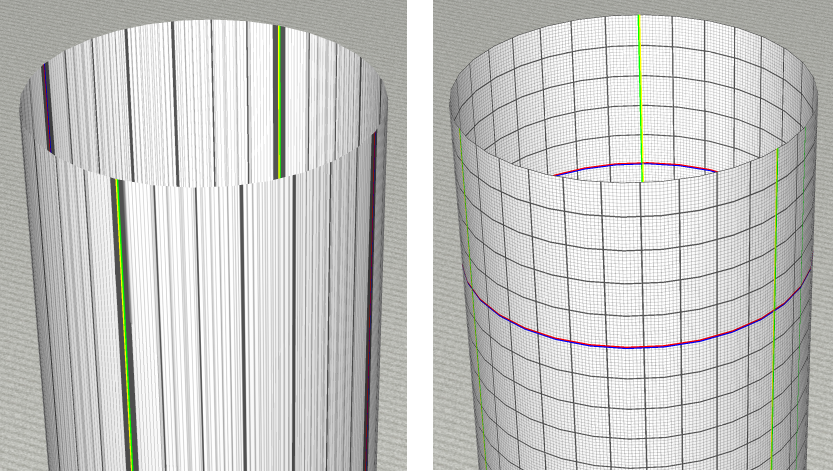
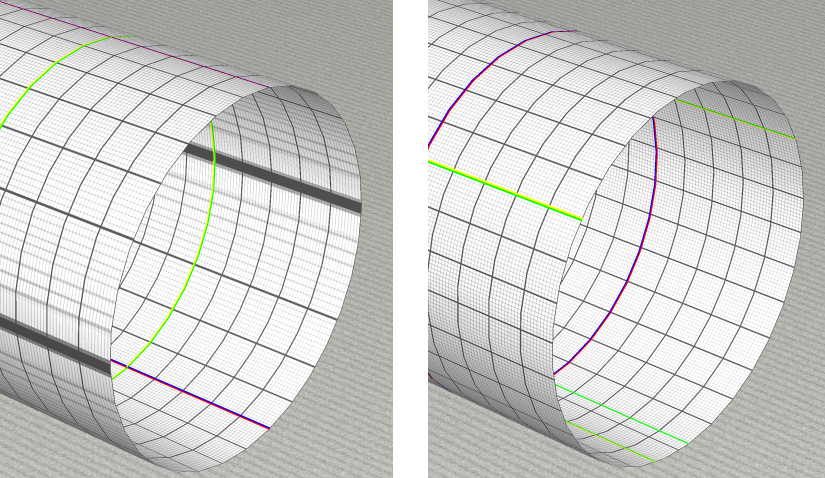
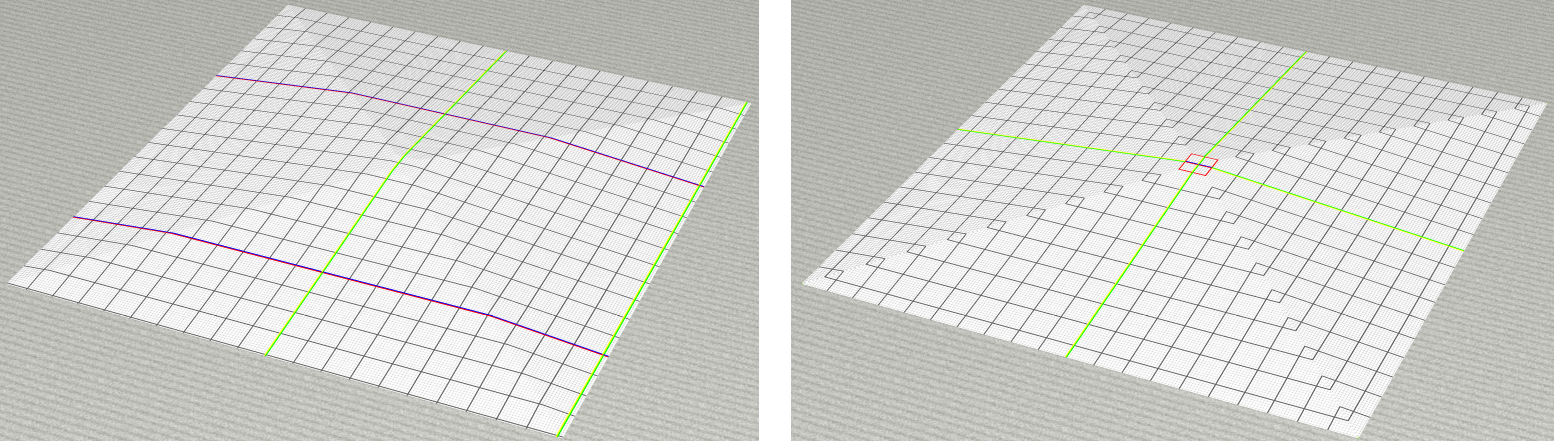
class Cylinder3D
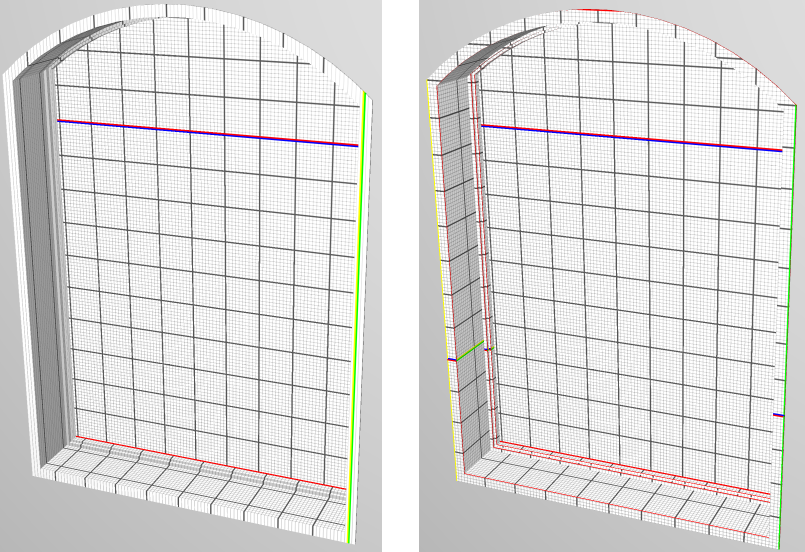
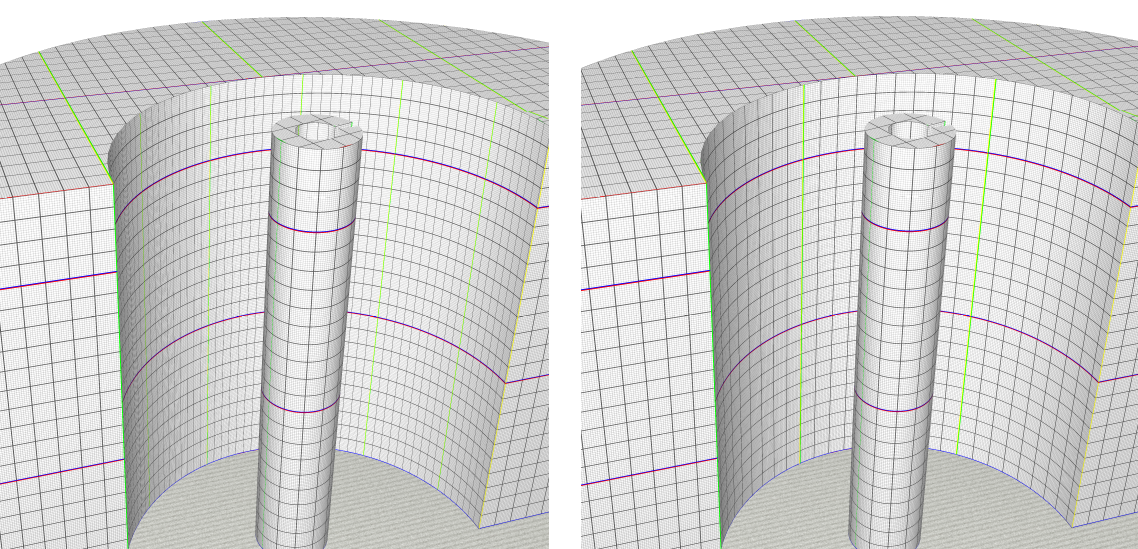
Improved UV mapping so that textures get applied uniformly across the mesh at a UV-to-world scale of 1 UV unit = 1m. This change should generally not require any migration effort, unless your extension has taken measure to counteract the previously incorrect UV mapping. Please note that this change does not affect ClosedCylinder3D.
Below are comparisons of how it looked before (left) and how it looks after the change (right).
 { width=400px }
 { width=400px }
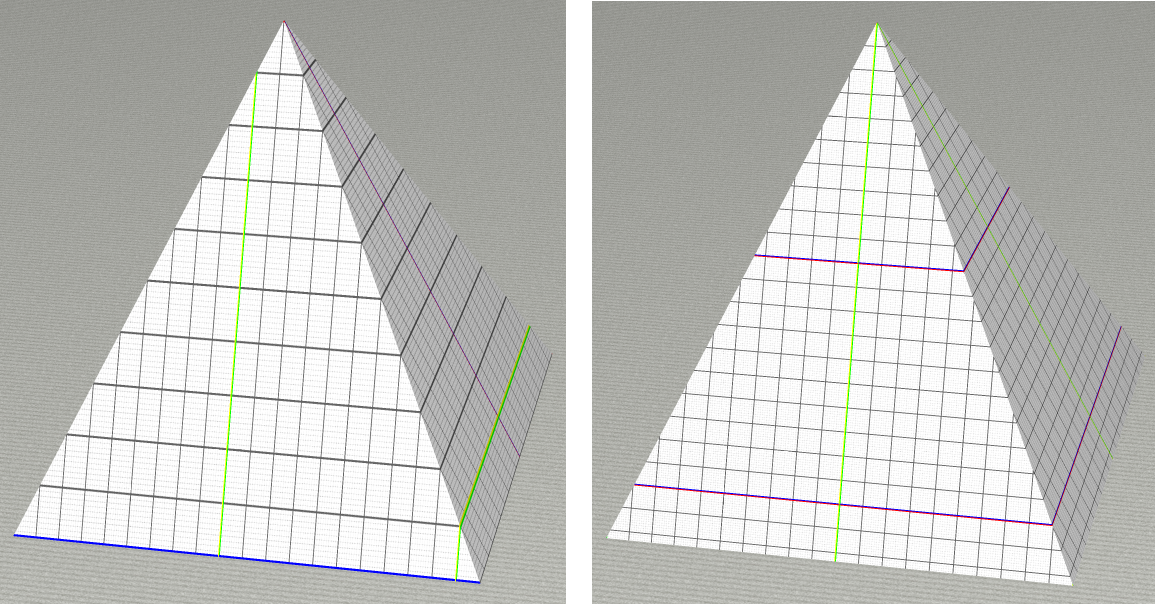
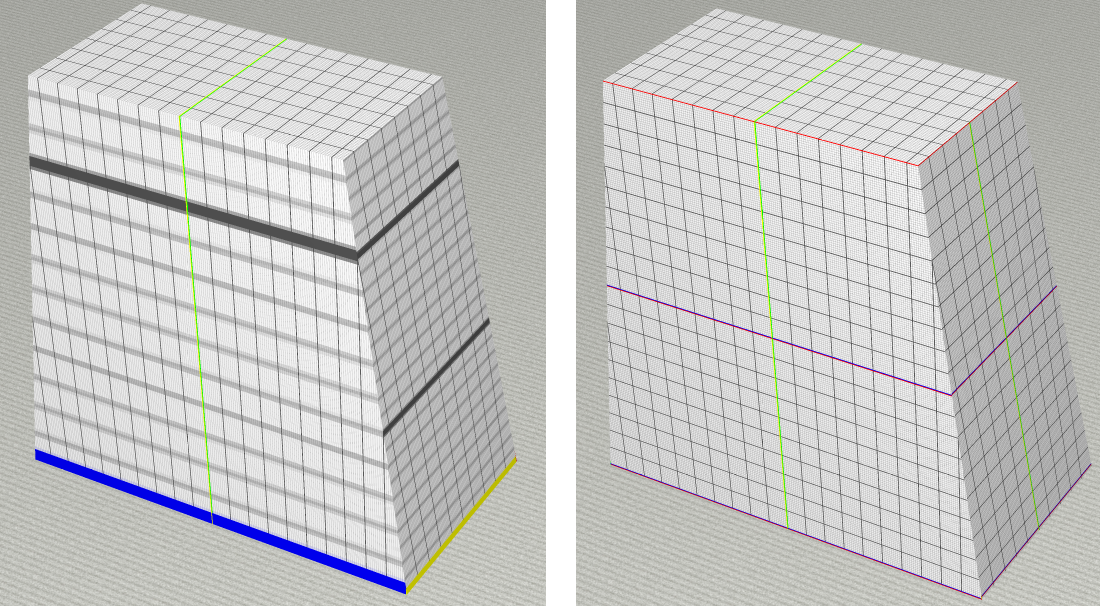
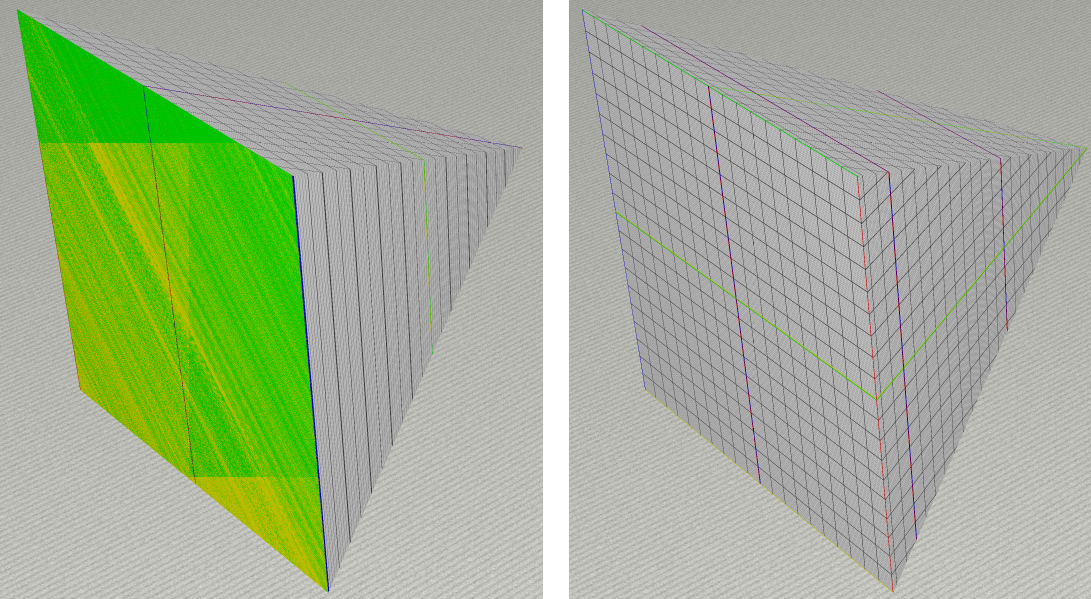
class Pyramid3D
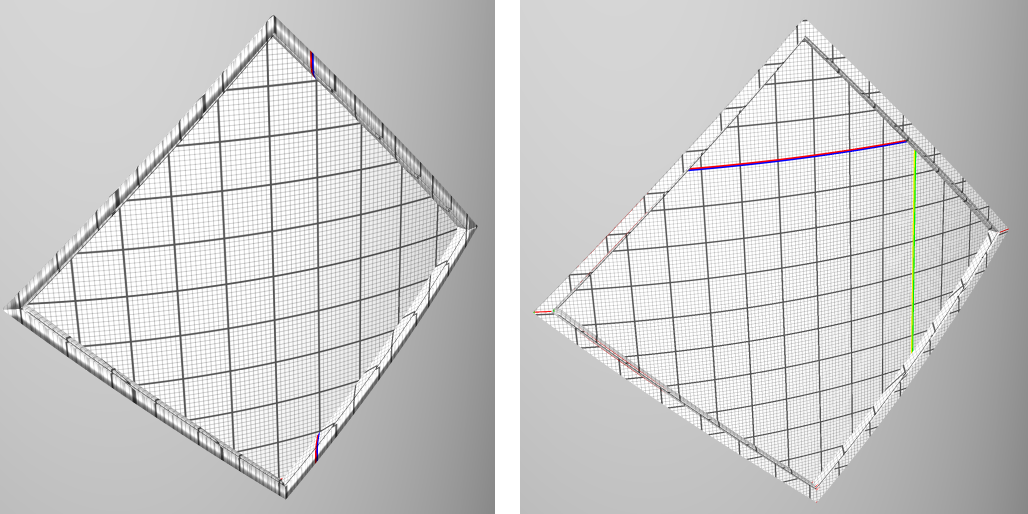
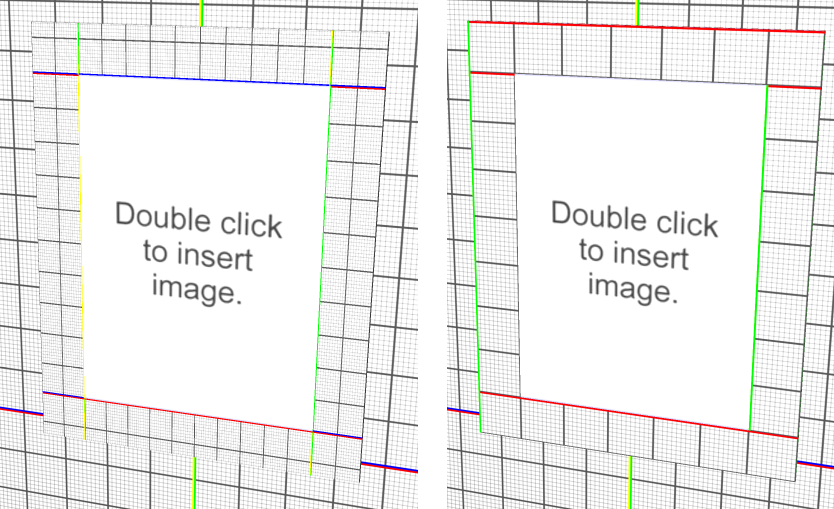
Improved UV mapping so that textures get applied uniformly across the mesh at a UV-to-world scale of 1 UV unit = 1m. This change should generally not require any migration effort, unless your extension has taken measure to counteract the previously incorrect UV mapping.
Below are comparisons of how it looked before (left) and how it looks after the change (right).
 { width=400px }
 { width=400px }
 { width=400px }
 { width=400px }
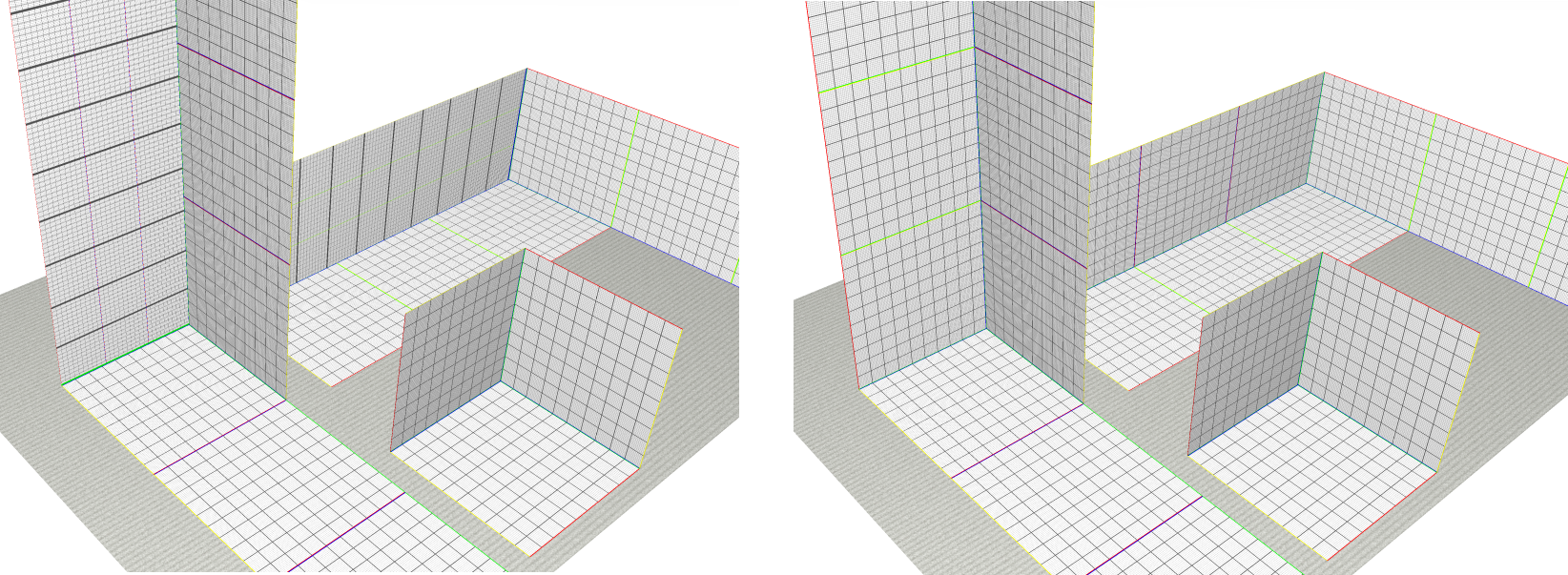
class Rect3D
Corrected the UV mapping of Rect3D's constructed with the type rect3DtypeWH. Previously, the width and depth component of the UV coordinates were swapped. This change should generally not require any migration effort, unless your extension has taken measure to counteract the previously incorrect UV mapping.
Below is a comparison of how it looked before (left) and how it looks after the change (right).
 { width=400px }
cm.geometry
Previously, rayMeshToleranceIntersect and cpp_rayMeshToleranceIntersect returned the point on the mesh that is closest to rayOrigin. It now returns the point on the mesh that is closest to the infinite line starting in rayOrigin with direction rayDir. If multiple points on the mesh have the same distance to that line, it will now choose among those the one that is closest to rayOrigin. This change affects, e.g., View3D.looseObjectIntersectionsAt, used in FuzzyAnimationHeapCandidatePicker.
cm.geometry2D
Previously, the inchesS(double v, bool showUnit, lcid local, int decimals, unitMagnitude magnitude) function would disregard the decimals value. This behavior has been updated to respect that argument.
cm.import.red3D
class PickerSettings
Previously, extend public int compare(REDPick a, REDPick b) { would compare a and b solely by their distance to the camera.
In the new version, it first compares the distance to the pick line; if those distances are equal, it falls back to the previous behavior of comparing their distance to the camera.
This new distance in REDPick, public double raySqrD = -1; is -1 by default and needs to be set manually if you call the REDPick constructor directly. Picks that have not set this value will be compared to other picks by old behavior.
cm.startup
class UserSettings
The location of saved preferences has changed from "
When loading saved UserSettings (such as RtSettings and CoreSettings) CET looks for the file in the folder in "\CET Preferences\
cm.std.accessories
class TestCubeSnapper
Changed the origin from the bottom-left corner to the bottom-center of the cube.
cm.std.print
Printed summaries now show summation type labels by default
Print Reports now has a summation-label setting for printed summary sum lines. The quotation list print UI includes a new checkbox for enabling or disabling summation type labels, and print/preview flows now pass that setting through when building summary lines. This applies both to quotation list printing and to calculation article view preview/print flows.
For 17.0, the setting defaults to enabled:
QuotationListChapterCreator.showSummationLabelsdefaults totrue- article view print/preview reads
view.summarySettings.getEnabled(cSumLabelSettingKey, default=true)
As a result, existing printouts or preview-based tests may show different summary labels than before unless the setting is explicitly turned off. If your code or tests compare printed summary text literally, update them to account for the label suffixes or disable the setting where appropriate.
cm.std.wall
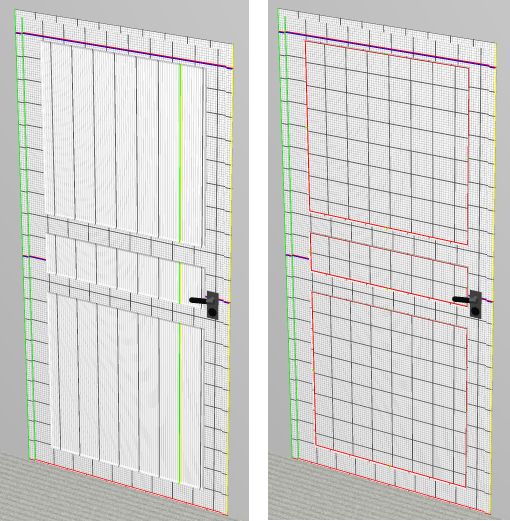
UV Improvements
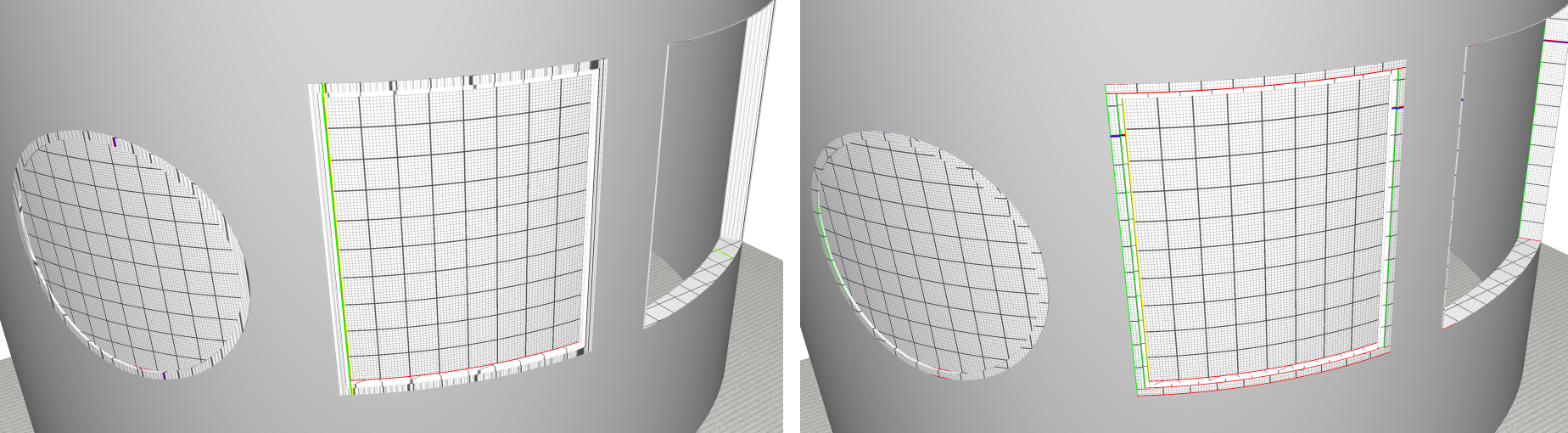
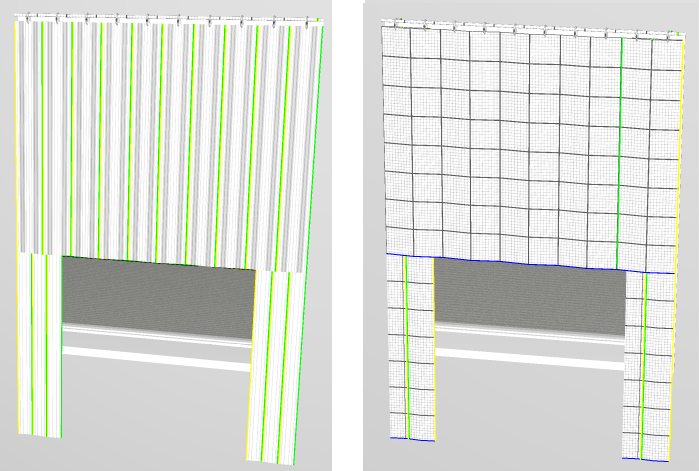
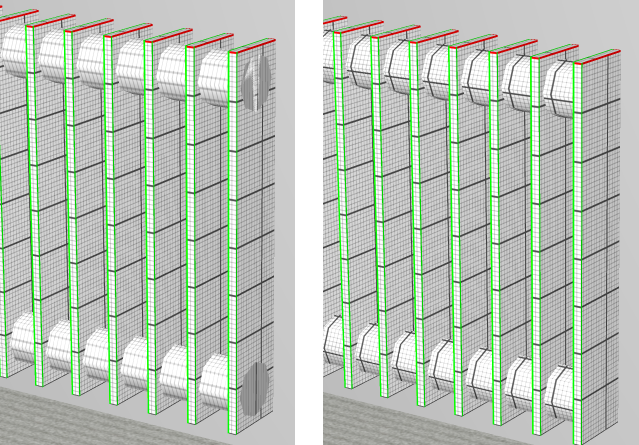
Improved UV mapping of many snappers in the wall package. In general, all symbols should now apply textures more uniformly across the mesh at a UV-to-world scale of 1 UV unit = 1m. However, smaller inaccuracies may still exist.
This change affect the following symbols (and possibly more):
- WallDoor
- Frameless glass
- Two panel
- Two panel, top curved
- Three panel
- Panel with glass
- Four panel
- Five panel
- WallWindow
- Straight, Frameless glass
- Straight, Glass with vault
- Curved, None
- Curved, Solid
- Curved, Glass
- Curved, Frameless glass
- Curved, Circular
- Curved, On edge vault
- Curved, Glass with vault
- WallSectionalDoor
- Curtain
- VenetiansBlinds
- WindowSill
- WallRadiator
- WallImageSnapper
- SimpleDrain
- WallArc
Below are some sample comparisons of how it looked before (left) and how it looks after the change (right).
 { width=400px }
 { width=400px }
 { width=400px }
 { width=400px }
 { width=400px }
 { width=400px }
 { width=400px }
 { width=400px }
cm.test.cmunit.testInstructions
class ClickInstruction
Now also triggers the snapper's click animation to more closely mimic an actual user click. Tests that start failing due to this are recommended be repeated by hand to figure out whether it's a false negative or not.
cm.win
Icon now returns DibImage
In 16.5, we introduced dibIcon(..) which loads icon as DibImage instead of MemoryImage. For 17.0, we are replacing the existing icon(..) to behave exactly as dibIcon(..).
Benefits of DibImage:
- Can be resized with less artifacts as DibImage do not premultiply alpha values
- Does not consume a windows GDI object, making it ideal for loading icons
For existing code that calls icon(..) and expects a MemoryImage, migration will be required.
Common symptoms are:
- Images not loading
- Toolbox icons get rendered instead of loading an icon
- Disabled images are not grayed out (blend is not applied)
How to resolve this:
- Perform a Find in Files, search for "as MemoryImage" and "in MemoryImage"
- Review the code if it can be generalized or change its logic accordingly
- Perform the necessary changes to make it work with DibImage
In core, we had 2 common scenarios.
- Blend not being applied:
// Previous logic only handles MemoryImage.
byte beforeBlend = 255;
if (image as MemoryImage) {
    beforeBlend = image.blend;
    image.blend = 100;
}
image.transparentDraw(c.hdc, imgPos);
if (image as MemoryImage) image.blend = beforeBlend;

// New logic now handles MemoryImage, DibImage and SvgImage.
byte beforeBlend = image.blend;
image.blend = 100;
image.transparentDraw(c.hdc, imgPos);
image.blend = beforeBlend;
- UIBuilder not handling DibImage:
// Previous logic only handles MemoryImage and Icon
if (limb as SnapperLimb) {
	if (limb.image in MemoryImage or limb.image in Icon) {
		button = snapperImage(window, label, limb, limb.src);
	}
} else if (limb as AnimationLimb or limb.image in Icon) {
	if (limb.image in MemoryImage) {
		button = animationImage(window, label, limb, limb.src);
	}
}

// New logic now handles MemoryImage, Icon, DibImage and SvgImage
if (limb as SnapperLimb) {
	if (limb.image in MemoryImage or limb.image in Icon or limb.image in DibImage or limb.image in SvgImage) {
		button = snapperImage(window, label, limb, limb.src);
	}
} else if (limb as AnimationLimb) {
	if (limb.image in MemoryImage or limb.image in Icon or limb.image in DibImage or limb.image in SvgImage) {
		button = animationImage(window, label, limb, limb.src);
	}
}
New SVG renderer
In 16.5 Minor:
- We have introduced a new SVG renderer that better supports the SVG spec.
- It is only used for CET Icon Library, not affecting SVG loaded anywhere else.
- The default SVG renderer a number of limitations, more information can be found here
For 17.0 Major:
- We are defaulting to use the new SVG Renderer everywhere in CET.
- You can choose to opt-out for cases the new renderer is incorrectly displaying the icons.
- The new default SVG renderer aims to support the whole SVG spec, more information can be found here
If you spot issues loading your svg icons, you can pass newSvgRenderer=false when you call icon(..)
// New svg renderer causing issues
icon("myIcon", #:pkg)
icon("myIcon", false, #:pkg)
vectorImage(url);

// Fallback to svg renderer used in CET 16.5
icon("myIcon", #:pkg, newSvgRenderer=false)
icon("myIcon", false, #:pkg, newSvgRenderer=false)
vectorImage(url, newSvgRenderer=false);
IconFinder
As we now have better SVG rendering capabilities in CET, IconFinder will search for SVG first before other suffixes.
Old: public str[] suffixSearchPriority = [".png", ".bmp", ".cmpng", ".cmbmp", ".svg"];
New: public str[] suffixSearchPriority = [".svg", ".png", ".bmp", ".cmpng", ".cmbmp"];
Previously, the inchesS(double v, bool showUnit, lcid local, int decimals, unitMagnitude magnitude) function would disregard the decimals value. This behavior has been updated to respect that argument.
custom.fika
Fika drawings depend on the opt-in migrator path during load
Fika's migration support depends on the shared cm.core.Snapper discovery path:
Snapper.loaded1()callsinitPartSpecialMigrator(formatter)getPartSpecialMigrator(init=true)resolves the snapper'spartSpecialMigratorprop- the returned
FikaDsPartSpecialMigratoris marked pending for older drawings - later
Snapper.migratePartSpecials(parts)invokes the actual migration
If the snapper does not expose the partSpecialMigrator prop, older Fika part or option specials saved under historical keys will not be migrated just because FikaDsPartSpecialMigrator exists in the package.
Fika sub-object Ind. Tags are migrated through legacyItemTagKey()
Older Fika drawings could save user-modified Ind. Tags under keys that included creator or panel-frame identity. In 17.0, those tags are recovered by asking each part for legacyItemTagKey() and then storing the user text through the shared UserTagInfoHolder.
If you copy the Fika pattern for your own package, make the legacy hook match the key format your old drawings actually streamed.